Monday, December 28, 2020

React Native Vector Icons

React Native Vector Icons is the best react native libraries to get icons. Here you can see the list of a lot of icons. You can use this for buttons, logos, and nav/tab bars. This is easily customizable. It has 3K+ icons.


Please review below git URL for more information 
(https://github.com/oblador/react-native-vector-icons) -


You can install this with the help of below command -
npm install --save react-native-vector-icons

Now please follow the instructions mentioned on below URL -
https://github.com/oblador/react-native-vector-icons#installation


How to apply - After successfully installation please follow the below steps -

Import below line -
import Icon from 'react-native-vector-icons/Ionicons';


Add icons on your view -
<Icon name="ios-person" size={20} color="#0BB4E4" />

here "ios-person" is the icon name.


Sharing some icons and their names which you can also find on below URL -
https://oblador.github.io/react-native-vector-icons/

stepforward, stepbackward, forward, banckward, caretright, caretleft, 
caretdown, caretup, rightcircle, leftcircle, upcircle, downcircle, 
rightcircleo, leftcircleo, upcircleo, downcircleo, verticleleft, 
verticleright, back, retweet, retweet, shrink, arrowsalt, doubleright,
doubleleft, arrowdown, arrowup, arrowright, arrowleft, down, up, right, 
left, minussquareo, minuscircle, minuscircleo, minus, pluscircleo, 
pluscircle, plus, infocirlce, infocirlceo, info, exclamation, 
exclamationcircle, exclamationcircleo, closecircle, closecircleo, 
checkcircle, checkcircleo, check, close, customerservice, creditcard, 
codesquareo, book, barschart, bars, question, questioncircle, 
questioncircleo, pause, pausecircle, pausecircleo, clockcircle, 
clockcircleo, swap, swapleft, swapright, plussquareo, frown, menufold, 
mail, link, areachart, linechart, home, laptop, star, staro, filter, 
meho, meh, shoppingcart, save, user, videocamera, totop, team, sharealt, 
setting, picture, phone, paperclip, notification, menuunfold, inbox, 
lock, qrcode, tags, tagso, cloudo, cloud, cloudupload, clouddownload, 
clouddownloado, clouduploado, enviroment, enviromento, eye, eyeo, 
camera, camerao, windows, export2, export, circledowno, circledown, hdd, 
ie, delete, enter, pushpino, pushpin, heart, hearto, smile-circle, 
smileo, frowno, calculator, chrome, github, iconfontdesktop, 
caretcircleoup, upload, download, piechart, lock1, unlock, windowso, 
dotchart, barchart, codesquare, plussquare, minussquare, closesquare, 
closesquareo, checksquare, checksquareo, fastbackward, fastforward, 
upsquare, downsquare, leftsquare, rightsquare, rightsquareo, 
leftsquareo, down-square-o, up-square-o, play, playcircleo, tag, tago, 
addfile, folder1, file1, switcher, addfolder, folderopen, search1, 
ellipsis1, calendar, filetext1, copy1, jpgfile1, pdffile1, exclefile1, 
pptfile1, unknowfile1, wordfile1, dingding, dingding-o, mobile1, 
tablet1, bells, disconnect, database, barcode, hourglass, key, flag, 
layout, printer, USB, skin, tool, car, addusergroup, carryout, 
deleteuser, deleteusergroup, man, isv, gift, idcard, medicinebox, 
redenvelopes, rest, Safety, wallet, woman, adduser, bank, Trophy, 
loading1, loading2, like2, dislike2, like1, dislike1, bulb1, rocket1, 
select1, apple1, apple-o, android1, android, aliwangwang-o1, 
aliwangwang, pay-circle1, pay-circle-o1, poweroff, trademark, find, 
copyright, sound, earth, wifi, sync, login, logout, reload1, message1, 
shake, API, appstore-o, appstore1, scan1, exception1, contacts, 
solution1, fork, edit, form, warning, table, profile, dashboard, 
indent-left, indent-right, menu-unfold, menu-fold, antdesign, 
alipay-square, codepen-circle, google, amazon, codepen, facebook-square, 
dropbox, googleplus, linkedin-square, medium-monogram, gitlab, 
medium-wordmark, QQ, skype, taobao-square, alipay-circle, youtube, 
wechat, twitter, weibo, HTML, taobao-circle, weibo-circle, weibo-square, 
CodeSandbox, aliyun, zhihu, behance, dribbble, dribbble-square, 
behance-square, file-markdown, instagram, yuque, slack, slack-square

Saturday, December 26, 2020

Best React Native Libraries and Component

 1. NativeBase - This provides great UI components for React Native and Vue Native apps. This also supports platform specific design. This is a fully open source. It provides some build-in paid/free themes which are available on its market place

NativeBase


2. Teaset - This is a UI library to React Native apps, it gives us 20+ pure JS(ES6) components, focusing on content display and action control. You can find more details on Github.

Teaset


3. Material Kit React Native - This provides free React Native Apps templates. This provides a large number of components and cards. This has a lot of components to build a great UI of your app. It provides pixel perfect screens. You can view the documentation on this link - https://demos.creative-tim.com/material-kit-react-native/docs/?_ga=2.234190430.1994806609.1608998238-98775155.1608998238#/. 

Material Kit React Native


4. React Native Elements - This is easy to use and supports Expo too. We can also easily customize it's components. Some components names are below -

Avatar, Badge, BottomSheet, Button, ButtonGroup, Card, CheckBox, Divider, Header, HTML style headings, Icon, Image, Input, ListItem, Overlay, Pricing, Rating, SearchBar, Slider, Social Icons / Social Icon Buttons, Tile, Tooltip

React Native Elements


5. Lottie for React Native - This is a good library to add animations into the Apps. 

Lottie for React Native


Sunday, August 11, 2019

ITMS-90338: Non-public API usage - The app references non-public selectors in _setAlwaysRunsAtForegroundPriority


I got below email from apple - 

Dear Developer,
We identified one or more issues with a recent delivery for your app, 
"-------". Please correct the following issues, then 
upload again.
ITMS-90338: Non-public API usage - The app references non-public 
selectors in ----: _setAlwaysRunsAtForegroundPriority:. If method names 
in your source code match the private Apple APIs listed above, altering 
your method names will help prevent this app from being flagged in 
future submissions. In addition, note that one or more of the above APIs 
may be located in a static library that was included with your app. If 
so, they must be removed. If you think this message was sent in error 
and that you have only used Apple-published APIs in accordance with the 
guidelines, send the app's Apple ID, along with detailed information 
about why you believe the above APIs were incorrectly flagged, to 
appreview@apple.com. For further information, visit the Technical 
Support Information at http://developer.apple.com/support/technical/
Best regards,
The App Store Team


Solution - This mostly comes with ionic / Cordova / Phonegap / Hybrid Apps. Please follow the below steps to solve this issue -
  
Stpe 1 -
cordova plugin rm cordova-plugin-ionic-webview

Stpe 2 -
cordova plugin add cordova-plugin-ionic-webview@4.1.0

This solved my problem. Hope so this will also work for you. If you have any questions related with this you can post a comment here.

Saturday, June 8, 2019

How to add slider in flutter


You can add slider in flutter with the help of “intro_slider” plugin. To integrate this please follow below steps -


Add below line in your pubspace.yam file -

dependencies:
  intro_slider: ^2.2.0


Now click on “Package get” option from top section to get this package in your app.


Now, Import below package in your file -

import 'package:intro_slider/intro_slider.dart';


Note - Make sure to add your images in pubspace.yaml file like this -

assets:
  - assets/images/photo_eraser.png
  - assets/images/photo_pencil.png
  - assets/images/photo_ruler.png


Slider images for Android and iOS


Create a new class as below -

import 'package:flutter/material.dart';
import 'package:intro_slider/dot_animation_enum.dart';
import 'package:intro_slider/intro_slider.dart';
import 'package:intro_slider/slide_object.dart';


class TutorialScreen extends StatefulWidget{

  TutorialScreen({Key key}) : super(key: key);

  @override
  TutorialScreenState createState() => new TutorialScreenState();

}


class TutorialScreenState extends State<TutorialScreen>{
  List<Slide> slides = new List();

  @override
  void initState() {
    super.initState();

    slides.add(
      new Slide(
        title: "ERASER",
        description: "Allow miles wound place the leave had. To sitting subject no improve studied limited",
        pathImage: "assets/images/photo_eraser.png",
        backgroundColor: Color(0xfff5a623),
      ),
    );
    slides.add(
      new Slide(
        title: "PENCIL",
        description: "Ye indulgence unreserved connection alteration appearance",
        pathImage: "assets/images/photo_pencil.png",
        backgroundColor: Color(0xff203152),
      ),
    );
    slides.add(
      new Slide(
        title: "RULER",
        description:
        "Much evil soon high in hope do view. Out may few northward believing attempted. Yet timed being songs marry one defer men our. Although finished blessing do of",
        pathImage: "assets/images/photo_ruler.png",
        backgroundColor: Color(0xff9932CC),
      ),
    );
  }

  void onDonePress() {
    // Do what you want
  }

  @override
  Widget build(BuildContext context) {
    return new IntroSlider(
      slides: this.slides,
      onDonePress: this.onDonePress,
    );
  }

}


Now call this from your main.dart file by using below code -

class MyApp extends StatelessWidget {
  // This widget is the root of your application.
  @override
  Widget build(BuildContext context) {
    return MaterialApp(
      title: 'Flutter Demo',
      theme: ThemeData(
        primarySwatch: Colors.blue,
      ),
      home: TutorialScreen(),
      debugShowCheckedModeBanner: false
    );
  }
}


This plugin have many options you can check all available options on below urls -


How to change project name in flutter


Solution for Android -

This is very simple in flutter, If you want to change the project name which will display on the mobile app. First, open your project in android studio or in any editor and then navigate to android/app/src/main/AndroidManifest.xml 


After this, you have to change the label value in AndroidManifest.xml  for android:label 

<application
    android:name="io.flutter.app.FlutterApplication"
    android:label=“APP Name”
    android:icon="@mipmap/ic_launcher">


Just replace “APP Name” with your app name. Now run your project in android simulator/device. 
Note - If changes are not updating then please uninstall your existing build and install again.


Solution for iOS - To update app name in iOS you just need to navigate on below location - 

ios/Runner/Info.plist


Now search for “CFBundleName” in Info.plist file and replace its value with your app name. Please check below example - 

<key>CFBundleName</key>
<string>APP Name</string>

Now, Run the app in simulator/Device. This will update your app name.

Note - Same as Android if the app name is not updating then please uninstall your existing build and install again.


This will update the app name for both (Android and iOS). 

Saturday, May 25, 2019

How to disable "Google Play Protect"?


Recently Google has added some security system updates. This not allow the app to install outside from Google pay. That is called the “Play Protect”. Google did this to manage some security futures. To prevent this you need to follow the below steps to disable Google Play Protect related to Google Play. To disable this please follow below steps - 

Step 1 - Open play store application from your device. Check the below screen.


Step 2 - Tap on the menu button. Check the below screen.


Step 3 - Select “Play protect” option from the menu list. Check the below screen.


Step 4 - Now disable the “Scan device for security threads”. Check the below screens.


In short, you need to follow this -

Open "Play Store" App in your mobile => Tap on Menu button from left side => Select "Play Protect" option in menu list => Now, Disable the options "Scan device for security threats".

Now you will be able to install your development app.


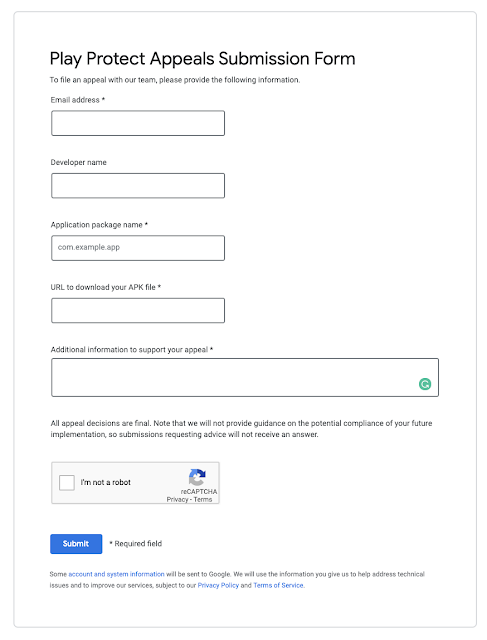
This has other permanent solution - You need to submit your app to Google for review on below URL then after few days this problem will be fixed for your app.


Play Protect Appeals Submission Form URL -  https://support.google.com/googleplay/android-developer/contact/protectappeals


Thursday, May 9, 2019

Top 10 ionic themes

Ionic market (https://market.ionicframework.com/) is a place where you can find themes and plugins related to the ionic framework. Some of them are below - 


1. ionBooking - Ionic 3 Hotel Booking Theme


This theme is related to hotel booking reservation, rent a car and tour activities. This supports many platforms (Android & iOS) and Web Apps (PWA). 

What is in this theme - Login, SignUp, Home, Edit Profile, Local Weather, Settings, Favorites, Booking list, Hotel search result, Hotel details, Hotel reviews modal, Hotel checkout, Message List, Message Detail, Rent a Car search, Rent a Car search results, Rent a Car Details, Rent a Car Checkout, Reviews, Tab Reviews, Tour Activities search, Tour Activities search results, Tour Activities Details, Tour Activities Checkout, Support, etc... 


Ionic Market link of this Theme - https://market.ionicframework.com/themes/ionbooking

Theme Demo URL - https://www.youtube.com/watch?v=3-mfpFlgegw


2. ionNetflix


This theme is related to film and television production as well as online distribution. This is available in ionic 3.x for Android and iOS platform. 


Ionic Market link of this Theme - https://market.ionicframework.com/themes/ionnetflix

Theme Demo URL - 


3. ionSpotify

This theme is for music, video and podcast services. This is available in ionic 3.x for Android and iOS platform. 

Ionic Market link of this Theme - https://market.ionicframework.com/themes/ionspotify

Theme Demo URL - 


4. ionFacebook

This theme UI is related to the Facebook app. This is available in ionic 3.x for Android and iOS platform. 

Ionic Market link of this Theme - https://market.ionicframework.com/themes/ionfacebook

Theme Demo URL - 


5. ionProperty - Ionic 3 Real Estate Properties Theme


This theme is related to real estate, It focused to buy, rent and sell your properties. This is available for Android, iOS, and PWA. It supports ionic 2.x,3.x

What is in this theme - Initial Slider, Auth, Home, Timeline, Settings, Invoices, Checkout, Chat with Broker, My Account, Authentication, Messages, Message Detail, Properties, Property Detail, Property Filter, Brokers, Broker Detail, Favorites, Get Pre-Approved, Your Property, About, Support, Schedule Visit, etc…


Ionic Market link of this Theme - https://market.ionicframework.com/themes/ionproperty

Theme Demo URL - https://www.youtube.com/watch?v=J0foFmlgY1s&feature=youtu.be


6. foodIonic - Ionic 3 Restaurant Food Order Theme


This theme is related to the restaurant food order. It focused on food and dishes order system. It supports Android, iOS, and PWA. It supports ionic 2.x,3.x

Pages in this theme - Home, About, Auth (Login & Register), Cart, Category, Checkout, Dish List, Dish Detail, Favorites, Favorite Dish, Message List, Message Detail, My Account, Near By, Notifications, Orders, Restaurant List, Restaurant Detail, Restaurant Filter, Settings, Support, Walkthrough, Your Restaurant, etc...


Ionic Market link of this Theme - https://market.ionicframework.com/themes/foodionic

Theme Demo URL - https://www.youtube.com/watch?v=PLVdB_DzBac


7. ionMessenger


This is related to messenger UI. This is very simple UI and it supports ionic 3.x, This is available for Android and iOS platforms.

Ionic Market link of this Theme - https://market.ionicframework.com/themes/ionmessenger

Theme Demo URL - 


8. Tinder UI 2


This is related to dating application. In this user can chat, it also has swiping cards UI. It supports ionic 2.x,3.x, This is available for iOS and Android platform. 

Screens available in this - Welcome, Explore (Swiping), Me, Settings, Tinder Plus, Profile, Profile Edit, Matched, Messaging, Feed, Chat (including Giphy-2 plugin)

Ionic Market link of this Theme - https://market.ionicframework.com/themes/tinder-ui-2

Theme Demo URL - https://www.youtube.com/watch?v=1iue76Dhx3o&feature=youtu.be


9. ionic ecommerce UI


This theme is related to E-commerce application. It support ionic 3/4. This is very easy to implement. It support for iOS, Android and Windows platforms. 

Screens available in this theme - Login, Sigup, Home, Categories, Category, Item detail, Filter, Attribute, Item options, Cart, Place order, Wishlist, My account, Setting, Welcome, Forgot password, Change password, My order

Ionic Market link of this Theme - https://market.ionicframework.com/themes/ionic-2-ecommerce-ui

Theme Demo URL - https://www.youtube.com/watch?v=wdOh1kXXY4g


10. Linkedin UI 2


This supports iOS and Android platforms. This is also available in ionic 2.x,3.x

Screens available - Welcome, Log in/Sign up, Side menu with zooming effect (pretty cool!), Home (news feed), Post, New Post, Search, Messaging, Chat, Network, Network Connections, Nofitications, Jobs, Settings, Profile


Ionic Market link of this Theme - https://market.ionicframework.com/themes/ionic-linkedin-2

Theme Demo URL - https://www.youtube.com/watch?v=Or-U0YAiqsc&feature=youtu.be